Can ChatGPT read your website? A GEO guide to showing up in AI search
Can ChatGPT, Perplexity, Copilot and Google’s AI answers read your site and cite it? A step-by-step GEO checklist for robots.txt, bot access, llms.txt and structured data.

- Reading time
- 6 min
- Sections
- 8
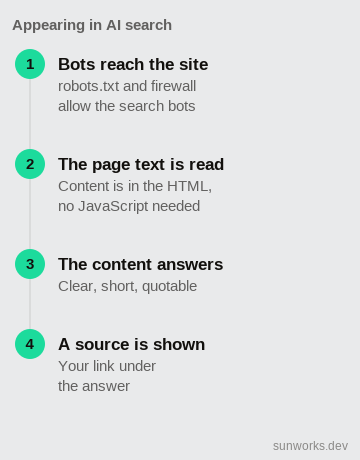
Short answer: ChatGPT and similar AI tools can read and cite a website only when three things hold. Their bots are not blocked by robots.txt or a firewall, the page text can be read without running JavaScript, and the content gives a clear, quotable answer to a question. This guide shows how to check each of the three and how to fix what is missing.
Search habits are changing. People no longer type every question into Google; they ask ChatGPT, Perplexity or Copilot and click the source links under the answer. Google's own results also show AI overviews. The work of being cited in these answers is called GEO, generative engine optimization.
What is GEO, and how is it different from SEO?
GEO does not replace SEO; it is a layer built on top of it. Most AI search tools draw on search indexes and on the sites themselves when they write an answer. Google's AI overviews rely on the Google index, and Copilot relies largely on the Bing index. A business that does not show up in search rarely shows up in AI answers either.
The difference is in how content is used. In classic search, people choose among ten links. In an AI answer, the tool picks sentences from a few sources, builds one answer and shows only a handful of sources. Clear, verifiable and easily quoted content wins.
Step 1: Can AI bots reach your site?
Each AI company reads sites with its own bots, and these bots follow robots.txt rules. The ones that matter most:
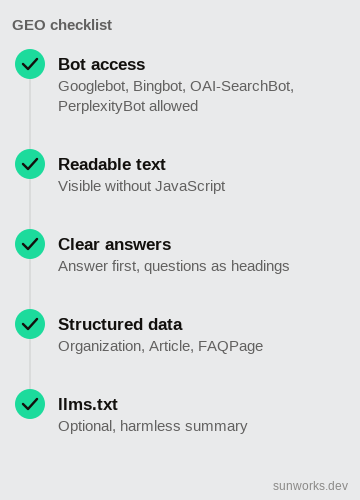
- Googlebot: feeds Google Search and its AI overviews. Block it and the site drops out of Google too.
- Bingbot: feeds Bing Search and Copilot answers.
- OAI-SearchBot: lets your site appear in ChatGPT search. See OpenAI's bot documentation.
- ChatGPT-User: visits when a user asks ChatGPT to open a page.
- GPTBot: the bot OpenAI uses for model training. Blocking it does not stop you from appearing in ChatGPT search.
- PerplexityBot: builds Perplexity's search index.
- Google-Extended: a setting that controls whether Google may use your content to train Gemini; it does not affect visibility in Google Search.
The most common mistake is blocking search bots while trying to block training bots. If robots.txt keeps a rule that closes the site to every bot, you will not appear in ChatGPT search either. If you do not want your content used for training, block only the training bots (such as GPTBot and Google-Extended) and leave the search bots open.
The second hidden barrier is the firewall. Settings such as "bot fight mode" or "block AI bots" in services like Cloudflare can stop these bots at the door even when robots.txt allows them. Check these options in your hosting panel and security settings.
Quick check: our AI visibility check reads your robots.txt for each of these bots and checks whether the homepage shows a bot challenge.
Step 2: Can the page text be read without JavaScript?
Most AI bots do not run JavaScript the way a browser does; they read the HTML the server sends. On sites that load their content in the browser afterwards (some single-page apps, heavy page builders), a bot can see an empty page.
It is easy to check: right-click the page in your browser, choose "View page source" and search for your main text. If the text is not in the source, bots cannot see it either. The fix is to render content on the server (server-side or static rendering), or at least to send the important text in the HTML.

The basic technical signals must be in place too:
- Every page needs its own title and meta description.
- No page should be excluded from the index by a stray "noindex".
- The canonical tag must point to the right address.
- The sitemap (sitemap.xml) should be listed in robots.txt and submitted to Search Console and Bing Webmaster Tools.
Step 3: Does the content give a quotable answer?
When AI tools build an answer, they pick the sentences that answer the question directly, not the whole page. Shaping content for this is the most effective part of GEO:
- Put the answer first. Let every page or section answer the question in its first two or three sentences, with the details after.
- Use questions as headings. A heading like "How much does a business website cost?" instead of "Pricing" matches what people ask AI tools.
- Be specific. Durations, price ranges, numbers of steps and conditions are quoted far more often than general praise.
- Cite sources. When you give a figure or a rule, link to the official source. Verifiable content builds trust.
- Make clear who you are. About, contact and service pages should state the business name, location and what it does.
- Add frequently asked questions. Short question and answer blocks give ready answers to people and AI tools alike.
Step 4: Add structured data and llms.txt
Structured data (schema.org) describes what a page is in a form machines understand: a business, a service, an article or an FAQ. Google's structured data documentation explains which types are supported. Use at least Organization or LocalBusiness for your business, Article for your posts and FAQPage for your FAQ sections. This data must match what is visible on the page.
llms.txt is a Markdown file at the root of your site that summarises your important pages for AI tools. It was proposed in 2024 and is not an official standard yet; Google has said it does not use the file for search. Still, it is easy to write and some tools read it. It is optional, and adding it does no harm.
Step 5: Measure the result
There is no single, exact way to measure visibility in AI answers, but these methods give a good picture:
- Check referrals in analytics. Track visits from sources such as chatgpt.com, perplexity.ai and copilot.microsoft.com separately.
- Read your server logs. You can see whether OAI-SearchBot, PerplexityBot and Bingbot visit your site.
- Ask yourself. Put your customers' questions to AI tools and see which sources are shown. Results vary by person and over time, so repeat this regularly.
Common mistakes
- Closing search bots while blocking training bots.
- Blocking AI bots wholesale in security settings and forgetting about it.
- Loading the main content only with JavaScript.
- Giving every page the same title and description.
- Putting information in structured data that is not on the page (fake ratings, questions nobody asked).
Frequently asked questions
Is GEO replacing SEO?
No. AI search tools rely largely on search indexes and on the sites themselves, so GEO does not work without an SEO foundation. GEO is a layer of content structure and bot access added on top of good SEO.
If I block GPTBot, will I disappear from ChatGPT?
GPTBot is the bot OpenAI uses for model training. Appearing in ChatGPT search is handled by OAI-SearchBot. If you block GPTBot and allow OAI-SearchBot, your content is not used for training but can still be cited in ChatGPT search.
Do I need an llms.txt file?
No. llms.txt is not an official standard yet and Google does not use it for search. Because it is easy to write and some AI tools read it, adding one does no harm, but the real effect comes from bot access and content structure.
When will my site appear in AI answers?
There is no fixed timeline. Bots can take days to weeks to read pages and add them to their indexes. Visibility depends on how clearly the content answers the question and on the overall trust in the site.
How do I check my site?
Our AI visibility check checks your robots.txt rules, bot challenge, sitemap, llms.txt, title, description and structured data for free. If you would like help fixing what is missing, see our SEO and GEO ready website service.