The dynamic QR code trap: why your printed QR code stops working one day
If the QR code on your menu, business card or packaging stops opening, a dynamic QR subscription is usually to blame. Static versus dynamic QR codes, the right choice and a checklist before printing.
- Reading time
- 4 min
- Sections
- 5
Short answer: when a printed QR code stops working, the cause is almost never the code itself but the service it points to. A dynamic QR code holds the QR service's short address, not yours; when the free trial ends or the subscription lapses, that address shuts down and the code leads to an empty page. A static QR code holds the content itself and never expires.
Discovering that a code does not work after printing thousands of menus, business cards, flyers or packages is an expensive surprise. This guide explains the difference between static and dynamic QR codes, the hidden cost of dynamic ones and the checks to make before you print.
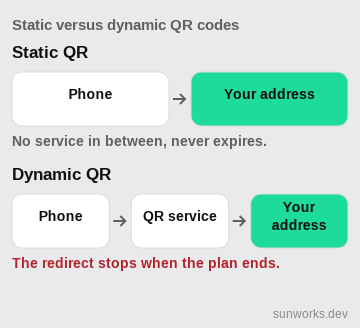
Static versus dynamic QR codes
A static QR code writes the information straight into the code: a web address, Wi-Fi details, a business card or text. When a phone reads it, it reaches that information directly, with no service in between. Once created, the code works the same way for good, but its content cannot be changed later.
A dynamic QR code holds the QR service's own short address. The phone goes first to that service's server, which then redirects the user to the address you set. You can change the destination later and see how often the code was scanned. In return, your code stays tied to that service.
The hidden cost of dynamic QR codes
Many QR sites create "free" codes, but the codes they create are dynamic and carry these risks:
- The trial ends. If you do not pay after the free trial, the redirect stops and printed codes no longer open.
- The price goes up or the service closes. Your code lives only as long as the service does.
- Visitor data goes to a third party. Every scan passes through the QR service's server first.
- The redirect slows things down. An extra hop delays loading, especially on a weak mobile connection.
The right choice: a static QR code and your own domain
For most businesses, the most robust approach is a static QR code that points to an address on your own domain. For your menu, for example, encode yourdomain.com/menu. When the menu changes, you update that page or a redirect on your site; the printed code stays the same and depends on no subscription. You can track scans with your site's own analytics.
A dynamic QR code only makes sense if you cannot create pages or redirects on your own site, and you have read the service's terms, pricing and what happens if you cancel.
Checklist before printing
Follow these rules so the code reads everywhere:
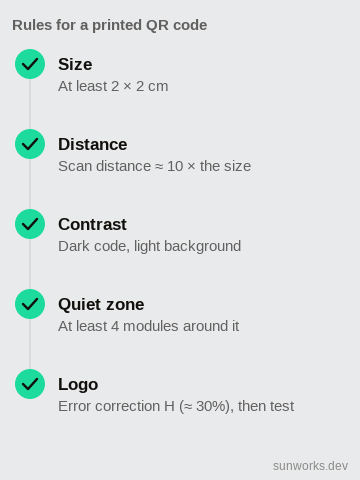
- Size: each side of a printed code should be at least 2 cm. The rule of thumb is a scanning distance of about ten times the code's size; a poster read from 1 metre needs a code of at least 10 cm.
- Contrast: dark code, light background. Printing a light code on a dark background stops some phones from reading it.
- Quiet zone: leave a blank margin at least four modules wide around the code; codes too close to an edge do not read.
- Error correction: if you put a logo in the middle, choose the highest error correction level (H, about 30 percent).
- Test: before printing, scan the code with several phones, both on screen and on a paper print.
- Format: use a vector file (SVG or PDF) for print; it stays sharp when enlarged.
Frequently asked questions
Do static QR codes expire?
No. In a static QR code the information is inside the code and no service stands in between. The code works as long as the address or information it shows is valid.
Can I save a dynamic QR code that is already printed?
Because the code still shows the service's short address, only that service can change the redirect. Apart from renewing the subscription there is usually no fix. That is why we recommend static codes pointing to your own domain for new prints.
Is it safe to put a logo in the middle of a QR code?
Yes, if you choose the highest error correction level. The logo covers part of the code, and error correction fills in the missing part. Keep the logo small and always test before printing.
How do I create a free QR code that never expires?
Our QR code generator creates static QR codes for links, Wi-Fi, business cards, WhatsApp, email, SMS, locations and events. There is no sign-up and no watermark; the code is made in your browser, test-scanned after every change and downloadable as SVG, PNG, JPG or PDF.