Why do contact form emails go to spam? Fixing SPF, DKIM and DMARC step by step
Are emails from your contact form landing in spam, or not arriving at all? The causes, how to set up SPF, DKIM and DMARC records properly, and the lasting fix with SMTP, step by step.

- Reading time
- 5 min
- Sections
- 7
Short answer: form emails usually land in spam because they are sent in your domain's name but cannot prove it. The fix is three DNS records: SPF (which servers may send for you), DKIM (a digital signature on each message) and DMARC (what to do when those checks fail). On top of that, the form should send through an authenticated SMTP service rather than from the web server.
Large mailbox providers such as Gmail, Yahoo and Outlook have tightened their rules in recent years. Since 2024, Google and Yahoo require senders to authenticate their mail; Google's sender guidelines explain the details. Messages that cannot prove who sent them go to spam or are not delivered at all. This guide explains why form emails get lost and how to fix it for good.
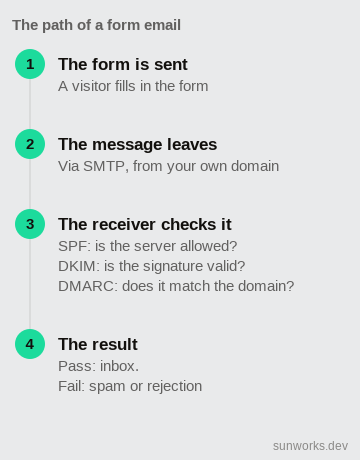
Why do form emails go to spam?
The most common causes:
- The email is sent from the web server. Systems such as WordPress send mail with PHP's mail() function from the hosting server by default. If that server is not in your domain's SPF record, the messages look forged.
- SPF, DKIM or DMARC is missing. The receiving server cannot verify that the message really came from you.
- The sender address is the visitor's address. Some forms put the visitor's address in the "From" field. That means sending email in someone else's name, which is almost always rejected.
- The shared server has a poor reputation. If another site on the same server sent spam, the server's IP address may be on a blocklist.
SPF: which servers may send for you?
SPF is a TXT record in your domain's DNS that lists the servers allowed to send email for you. An example record:
v=spf1 include:_spf.google.com include:spf.example-service.com ~all
Things to watch:
- The domain must have one SPF record. If there are two, both are treated as invalid; combine the services in a single record.
- The record may cause at most 10 DNS lookups (RFC 7208). Too many "include" entries break this limit.
- It should end in ~all (soft fail) or -all (hard fail). +all allows everyone and makes the record pointless.

DKIM: a digital signature on each message
DKIM adds a signature to every outgoing message; the receiving server verifies it with the public key in your DNS. This proves the message was not changed on the way and really left your domain.
You do not create the DKIM key yourself; your email service (Google Workspace, Microsoft 365, Zoho, or the SMTP service you use) gives you a record. It is usually a TXT or CNAME record named selector._domainkey.yourdomain.com. Remember to switch DKIM on in the service's panel; adding the record alone may not be enough.
DMARC: what happens when the checks fail?
DMARC combines the SPF and DKIM results and tells the receiving server what to do with messages that fail. It is a TXT record at _dmarc.yourdomain.com:
v=DMARC1; p=none; rua=mailto:dmarc@yourdomain.com
The policy (p) takes one of three values:
- none: monitor only, do not affect messages. The right choice to start with.
- quarantine: send failing messages to spam.
- reject: reject failing messages outright.
The recommended path is to watch the reports for a few weeks with p=none, make sure all your legitimate sending sources pass SPF and DKIM, then move to quarantine and finally reject. This also stops others from abusing your domain in forged email.
The lasting fix: send the form through SMTP
Even with correct DNS records, sending from the web server is risky. The lasting fix:
- Use an SMTP service. This can be your business email account or a sending service built for transactional email.
- Connect the site to SMTP. On WordPress with an SMTP plugin, on other systems in the form's settings.
- Send from your own domain. For example form@yourdomain.com.
- Put the visitor's address in "Reply-To". Replying then goes straight to the visitor, while the message still leaves from your domain.
- Test. Fill in the form with Gmail and Outlook addresses and confirm the messages reach the inbox.
Checklist
- The domain's MX record points to the right mail server.
- There is one SPF record and it includes every sending service.
- DKIM is switched on in the email service and published in DNS.
- A DMARC record exists and its reports are monitored.
- The form sends through SMTP, from your own domain.
- The visitor's address is in "Reply-To".
Frequently asked questions
Do I need SPF, DKIM and DMARC?
Yes. SPF and DKIM prove identity, while DMARC makes sure that proof matches your domain and decides what happens to failing messages. Large providers now expect all three; when one is missing, deliverability drops noticeably.
Should I set DMARC to reject straight away?
No. Start with p=none and check in the reports that all your legitimate sending sources pass authentication. Otherwise mail from a service you forgot to add, such as your invoicing system or newsletter tool, may be rejected.
I added the records, so why does mail still go to spam?
DNS changes can take a few hours to spread. If that time has passed, check whether the email is still sent from the web server, whether the sender address is on your own domain and whether DKIM is switched on in the service. A sending server on a blocklist can also be the cause.
How do I check my records?
Our email settings check checks your domain's MX, SPF, DKIM and DMARC records over public DNS for free and shows what is missing. If you would like help with the setup, see our technical support service or our domain and hosting service.